If you’re looking for the best monitor calibrators for photographers in 2026, I recommend considering options like the Calibrite Display Plus HL, Datacolor SpyderX Pro, and X-Rite ColorMunki Smile, all offering top-tier accuracy and ease of use. These tools support HDR, multi-monitor setups, and quick calibration, making your workflow smoother. If you want precise color matching and reliable results, there’s plenty more to explore—keep going to find the perfect fit for your needs.
Key Takeaways
- Prioritize calibrators supporting high-brightness and HDR displays for accurate color in professional photography workflows.
- Choose devices with user-friendly interfaces and quick calibration features for efficiency.
- Consider portable options compatible with mobile devices for on-the-go color management.
- Opt for multi-device calibration tools with advanced features like ambient light sensors and soft proofing.
- Ensure compatibility with popular software, high measurement accuracy (delta E < 2), and reliable software support.
| Calibrite Display Plus HL Monitor Calibration Colorimeter | HDR Professional | Compatibility: Wide range including Mini LED, OLED, Apple XDR, projectors, LCD | Calibration Speed: Up to 1 minute | Software Features: Advanced control, profiles, validation tools | VIEW LATEST PRICE | See Our Full Breakdown | |
| Datacolor Spyder5PRO for Photographers and Designers |  | Creative Essential | Compatibility: Laptop and desktop displays | Calibration Speed: About 5 minutes | Software Features: Room light monitoring, “Before and After” | VIEW LATEST PRICE | See Our Full Breakdown |
| Datacolor Spyder X Pro Monitor Calibration Tool |  | Fast & Accurate | Compatibility: Multiple monitors, laptops, desktops | Calibration Speed: 1-2 minutes | Software Features: Visual evaluation, multi-monitor support | VIEW LATEST PRICE | See Our Full Breakdown |
| X-Rite ColorMunki Smile (CMUNSML) |  | User-Friendly | Compatibility: Laptops and desktops, mobile devices (via app) | Calibration Speed: Minutes | Software Features: Wizard-driven, easy interface | VIEW LATEST PRICE | See Our Full Breakdown |
| Datacolor Spyder Monitor Calibrator for Creators | Creative Workflow | Compatibility: OLED, LED, Apple XDR, HDR displays | Calibration Speed: About 90 seconds | Software Features: Pre-set and customizable calibration | VIEW LATEST PRICE | See Our Full Breakdown | |
| Calibrite Display Pro HL Monitor Calibration Colorimeter | Compact Precision | Compatibility: LCD, Mini LED, OLED, Apple XDR, projectors | Calibration Speed: Quick process (approx. 1-2 minutes) | Software Features: Automated adjustments, validation tools | VIEW LATEST PRICE | See Our Full Breakdown | |
| Datacolor Spyder X2 Elite Monitor Color Calibrator | 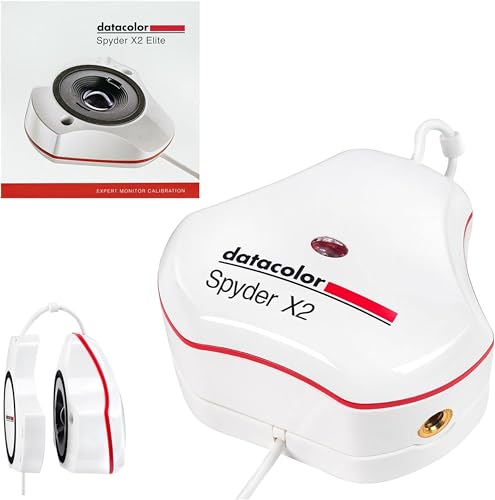 | Versatile Compatibility | Compatibility: Photographic and video monitors, hybrid workflows | Calibration Speed: Fast, around 1-2 minutes | Software Features: User-friendly, professional options | VIEW LATEST PRICE | See Our Full Breakdown |
| Calibrite ColorChecker Studio Spectrophotometer for Color Management |  | All-in-One | Compatibility: Monitors, projectors, printers, cameras | Calibration Speed: Variable, typically quick | Software Features: Adaptive profiling, print matching | VIEW LATEST PRICE | See Our Full Breakdown |
| Calibrite Display 123 Monitor Calibration Colorimeter |  | Easy & Reliable | Compatibility: Up to two monitors, various display types | Calibration Speed: Guided, quick (approx. 1 minute) | Software Features: Guided workflow, comparison view | VIEW LATEST PRICE | See Our Full Breakdown |
| Calibrite Video Photo Kit with Colorimeter and ColorChecker |  | Professional Kit | Compatibility: HDR, mini-LED, OLED, Apple XDR, multiple devices | Calibration Speed: Variable, efficient | Software Features: Profiles, camera, and print matching | VIEW LATEST PRICE | See Our Full Breakdown |
| Calibrite ColorChecker Display Pro (CCDIS3) |  | Consistent Colors | Compatibility: Monitors, projectors, and professional displays | Calibration Speed: Quick, typically under 2 minutes | Software Features: User-friendly, calibration and profiling | VIEW LATEST PRICE | See Our Full Breakdown |
More Details on Our Top Picks
-
Datacolor Spyder5PRO – Designed for Serious Photographers and Designers (S5P100)
Advanced color accuracy solution for all of your laptop and desktop displays - See, share and print your...
As an affiliate, we earn on qualifying purchases.
Calibrite Display Plus HL Monitor Calibration Colorimeter
The Calibrite Display Plus HL Monitor Calibration Colorimeter is an excellent choice for photographers working with HDR and high-brightness displays, thanks to its advanced HL high luminance sensor that measures up to 10,000 nits. This allows for precise calibration of even the brightest screens, like Apple XDR and Mini LED displays. Its compatibility spans LCD, OLED, projectors, and more, ensuring accurate HDR performance across various setups. The device pairs with Calibrite PROFILER software, offering thorough control over white point, luminance, gamma, and contrast. Its compact size, durable build, and multi-monitor support make it a top tool for professionals demanding high accuracy and consistency.
- Compatibility:Wide range including Mini LED, OLED, Apple XDR, projectors, LCD
- Calibration Speed:Up to 1 minute
- Software Features:Advanced control, profiles, validation tools
- Luminance Measurement:Up to 10,000 nits
- Multi-Display Support:Multi-monitor profiling, synchronization
- Portability & Design:Compact, travel pouch
- Additional Feature:HDR luminance up to 10,000 nits
- Additional Feature:Multi-monitor profiling supported
- Additional Feature:Built-in 1/4 mount thread
-
Datacolor Spyder X Pro – Monitor Calibrator. Color Calibration Tool for Monitor Display. Ensures accurate color for photographic images. Ideal for first-time users
𝗘𝗡𝗦𝗨𝗥𝗘 𝗔𝗖𝗖𝗨𝗥𝗔𝗧𝗘 𝗖𝗢𝗟𝗢𝗥: Groundbreaking lens-based color engine provides a higher level of color accuracy for multiple monitors. Spyder...
As an affiliate, we earn on qualifying purchases.
Datacolor Spyder5PRO for Photographers and Designers
Designed specifically for serious photographers and designers, the Datacolor Spyder5PRO delivers professional-grade color calibration for both laptops and desktops. It’s quick, taking about five minutes to fully calibrate your monitor, guaranteeing reliable color accuracy and consistency. The device offers RGB calibration, room light monitoring to optimize brightness, and display analysis tools to evaluate performance. You can compare “Before and After” calibration using your own photos, helping you focus on critical details. It ensures your images look just as intended across screens, prints, and shares, reducing unnecessary reprints and streamlining your workflow. Just remember to avoid direct light on the display during calibration for the best results.
- Compatibility:Laptop and desktop displays
- Calibration Speed:About 5 minutes
- Software Features:Room light monitoring, “Before and After”
- Luminance Measurement:Room light, ambient conditions
- Multi-Display Support:Supports multiple monitors
- Portability & Design:Handheld, portable
- Additional Feature:Room light monitoring included
- Additional Feature:“Before and After” evaluation
- Additional Feature:Quick calibration process
-
X-Rite ColorMunki Smile (CMUNSML)
Perfect for creative and photo hobbyists striving to take the next step forward in digital imaging – edit,...
As an affiliate, we earn on qualifying purchases.
Datacolor Spyder X Pro Monitor Calibration Tool
For photographers seeking quick, reliable calibration, the Datacolor Spyder X Pro stands out with its advanced lens-based color engine, ensuring highly accurate color accuracy across multiple monitors. It features room-light monitoring and automatic profile adjustments, improving white balance and shadow detail effortlessly. Designed for ease of use, it offers a simple, one-click calibration via a straightforward wizard—perfect for both beginners and experienced users. The process takes just a couple of minutes, making calibration quick and efficient. Plus, SpyderProof allows visual comparison of before-and-after results with personal images, and the software supports multiple devices to maintain consistent color across all screens.
- Compatibility:Multiple monitors, laptops, desktops
- Calibration Speed:1-2 minutes
- Software Features:Visual evaluation, multi-monitor support
- Luminance Measurement:Ambient light sensor, white balance
- Multi-Display Support:Supports multiple devices
- Portability & Design:Small, lightweight
- Additional Feature:SpyderProof comparison feature
- Additional Feature:Supports multiple displays
- Additional Feature:Auto white balance adjustment
X-Rite ColorMunki Smile (CMUNSML)
If you’re looking for an easy-to-use calibration tool that delivers professional-level color accuracy, the X-Rite ColorMunki Smile (CMUNSML) is a great choice for creative hobbyists and photographers alike. It simplifies display calibration for both laptops and desktops, using advanced color engine technology found in top-tier solutions. Its intuitive, wizard-driven software lets you see “before and after” results instantly, with just a few clicks and on-screen guidance. Plus, it’s mobile-friendly, compatible with the X-Rite ColorTRUE app to calibrate iOS devices. In minutes, it assures color precision, enhances shadow and highlight details, and ensures consistent print matches.
- Compatibility:Laptops and desktops, mobile devices (via app)
- Calibration Speed:Minutes
- Software Features:Wizard-driven, easy interface
- Luminance Measurement:Basic luminance control
- Multi-Display Support:Supports multiple displays
- Portability & Design:Portable, mobile-friendly
- Additional Feature:Mobile device calibration compatible
- Additional Feature:Instant “before and after” results
- Additional Feature:Simple wizard-driven interface
Datacolor Spyder Monitor Calibrator for Creators
Ever wonder how creators can guarantee their colors stay true across any display? The Datacolor Spyder Monitor Calibrator for Creators makes it simple. It quickly calibrates OLED, LED, and other screens in about 90 seconds, ensuring accurate color reproduction. Its software offers pre-set options for beginners and customizable settings for pros. The DevicePreview™ Beta simulates how images will look on various devices, helping you anticipate color consistency. Plus, an ambient light sensor adjusts brightness automatically based on your room’s lighting. Compact and portable, the Spyder provides reliable, professional-grade calibration, making it a must-have tool for anyone serious about color accuracy.
- Compatibility:OLED, LED, Apple XDR, HDR displays
- Calibration Speed:About 90 seconds
- Software Features:Pre-set and customizable calibration
- Luminance Measurement:Room light measurement
- Multi-Display Support:Supports multiple devices
- Portability & Design:Compact, portable
- Additional Feature:DevicePreview™ Beta device simulation
- Additional Feature:Ambient light sensor included
- Additional Feature:Supports OLED and mini-LED displays
Calibrite Display Pro HL Monitor Calibration Colorimeter
The Calibrite Display Pro HL stands out for photographers who need precise calibration of high-brightness displays, thanks to its advanced high luminance sensor that measures up to 3000 nits. This makes it ideal for calibrating LCD, Mini LED, OLED, and Apple XDR screens, ensuring accurate color, tone, and contrast. It features a USB-C connection with a USB A adapter, plus a built-in 1/4 mount thread for versatility. The included travel pouch makes it portable. Paired with Calibrite’s PROFILER software, it offers robust tools for calibration, validation, and uniformity checks, making it perfect for professional workflows that demand consistent, reliable color accuracy across multiple displays.
- Compatibility:LCD, Mini LED, OLED, Apple XDR, projectors
- Calibration Speed:Quick process (approx. 1-2 minutes)
- Software Features:Automated adjustments, validation tools
- Luminance Measurement:High luminance sensor (up to 3000 nits)
- Multi-Display Support:Multi-monitor workflows
- Portability & Design:Portable, easy to place
- Additional Feature:Validation and uniformity tools
- Additional Feature:Supports multi-workstation workflows
- Additional Feature:Portable with travel pouch
Datacolor Spyder X2 Elite Monitor Color Calibrator
The Datacolor Spyder X2 Elite stands out for its advanced calibration features tailored to professionals who demand precise color accuracy across both photography and video workflows. It supports versatile targets like Rec. 709 and Rec. 2020, along with advanced display mapping and analysis. The software’s clean, intuitive interface makes calibration accessible for users of all skill levels, from beginners to experts. It connects easily via native USB-C, with an included USB-A adapter for added convenience. Designed for flexibility, it handles multiple monitor setups and soft proofing, making it ideal for hybrid workflows that require consistent, reliable color across all your devices.
- Compatibility:Photographic and video monitors, hybrid workflows
- Calibration Speed:Fast, around 1-2 minutes
- Software Features:User-friendly, professional options
- Luminance Measurement:Advanced, high luminance support
- Multi-Display Support:Supports multiple devices
- Portability & Design:Compact, portable
- Additional Feature:Soft proofing and studio match
- Additional Feature:Supports video and cinema targets
- Additional Feature:Native USB-C connection
Calibrite ColorChecker Studio Spectrophotometer for Color Management
If you need a thorough calibration tool that guarantees color accuracy across multiple devices, the Calibrite ColorChecker Studio Spectrophotometer is an excellent choice. It supports camera to print color control, monitor display, projector profiling, printer paper, and scanners. The device includes Calibrite PROFILER software, a USB cable, and a monitor profiling holder pouch. Its intelligent, adaptive profiling optimizes results during each session, reducing color drift. It also measures ambient light for accurate print-to-screen matching, ensuring consistent proofing. Plus, with the ColorChecker Mini target, it offers custom camera profiles for RAW workflows, providing a solid foundation for editing and grading.
- Compatibility:Monitors, projectors, printers, cameras
- Calibration Speed:Variable, typically quick
- Software Features:Adaptive profiling, print matching
- Luminance Measurement:Ambient light measurement included
- Multi-Display Support:Profiles multiple devices and printers
- Portability & Design:Handheld, portable
- Additional Feature:Supports camera to print profiling
- Additional Feature:Adaptive iterative profiling process
- Additional Feature:Includes ColorChecker Mini target
Calibrite Display 123 Monitor Calibration Colorimeter
Designed for photographers who need quick, accurate color calibration, the Calibrite Display 123 Monitor Calibration Colorimeter simplifies the process with its intuitive 1-2-3 software workflow. Its USB-C connection makes setup straightforward, supporting calibration of up to two displays for multi-screen consistency. The compact design, measuring just 34mm by 37mm, guarantees easy placement, and the adjustable counterweight helps optimize positioning. It guides you through a simple calibration process, correcting common color shifts for truer tones and reliable contrast. The built-in comparison view allows instant before-and-after verification, guaranteeing your colors stay consistent across sessions. It’s an efficient tool for achieving professional-grade color accuracy.
- Compatibility:Up to two monitors, various display types
- Calibration Speed:Guided, quick (approx. 1 minute)
- Software Features:Guided workflow, comparison view
- Luminance Measurement:Adjustable luminance targets
- Multi-Display Support:Supports two displays
- Portability & Design:Small, ergonomic
- Additional Feature:Supports calibration of two displays
- Additional Feature:Built-in before-and-after comparison
- Additional Feature:Adjustable counterweight for placement
Calibrite Video Photo Kit with Colorimeter and ColorChecker
For photographers and videographers seeking reliable color accuracy across multiple devices, the Calibrite Video Photo Kit with Colorimeter and ColorChecker stands out. It includes the Display Plus HL colorimeter and ColorChecker Passport Video 2, tailored for monitor calibration, white balance, exposure, and camera matching. It supports high-brightness displays like mini-LED, OLED, and Apple XDR panels, ensuring precise color reproduction. The kit helps establish correct white points, verify exposure, and maintain consistent footage and stills across lighting conditions. With streamlined workflows and dependable color references, it’s perfect for professionals demanding trustworthy calibration from capture to post-production.
- Compatibility:HDR, mini-LED, OLED, Apple XDR, multiple devices
- Calibration Speed:Variable, efficient
- Software Features:Profiles, camera, and print matching
- Luminance Measurement:High luminance support, ambient measurement
- Multi-Display Support:Multi-device calibration
- Portability & Design:Portable kit
- Additional Feature:High brightness display support (up to 10,000 nits)
- Additional Feature:Camera profiling with ColorChecker
- Additional Feature:Reliable reference setting for video
Calibrite ColorChecker Display Pro (CCDIS3)
The Calibrite ColorChecker Display Pro (CCDIS3) stands out with its optical design that guarantees high repeatability across various display types, making it ideal for photographers who demand consistent and accurate color calibration. Its design assures reliable profiles whether you’re working with different screens or multiple devices. The rotatable diffuser arm adds versatility, functioning as a stand for projector profiling, measuring ambient light, or covering the optics. It also features an integrated tripod mount, perfect for larger venues. Easy to operate and compatible with ccProfiler or i1Profiler software, this calibrator simplifies maintaining precise color across all your displays.
- Compatibility:Monitors, projectors, and professional displays
- Calibration Speed:Quick, typically under 2 minutes
- Software Features:User-friendly, calibration and profiling
- Luminance Measurement:Ambient light measurement included
- Multi-Display Support:Supports multiple displays
- Portability & Design:Compact, easy to position
- Additional Feature:Rotatable diffuser arm
- Additional Feature:Integrated tripod mount
- Additional Feature:Designed for high repeatability
Factors to Consider When Choosing Monitor Calibrators for Photographers (Hardware)
When choosing a monitor calibrator, I consider factors like display compatibility and calibration accuracy to guarantee precise results. Ease of use and brightness measurement range also matter, especially for workflows that demand quick adjustments. Ultimately, I look for tools that integrate seamlessly with my software and meet my specific hardware needs.
Display Compatibility Needs
Choosing a monitor calibrator that matches your display technology is vital for achieving accurate colors, especially if you’re working with advanced screens like OLED or Mini LED. You need to guarantee the calibrator supports your specific display type, whether it’s OLED, LCD, or projection systems. It’s also essential to verify compatibility with your monitor’s size and resolution, including HDR-capable displays reaching up to 10,000 nits luminance. If you work with multiple screens, confirm the device can handle multi-monitor setups for consistent color accuracy across all displays. Additionally, check if the calibrator supports your operating system, whether Windows or Mac, for smooth integration. High-brightness displays like Apple XDR demand specialized hardware that can measure and profile professional-grade panels accurately.
Calibration Accuracy Levels
Achieving precise color accuracy hinges on selecting a calibrator with high measurement fidelity, as even small discrepancies can substantially impact your workflow. Higher calibration accuracy levels mean your monitor’s colors closely match the original source or output medium, which is vital for professional work. Professional-grade calibrators often deliver delta E values below 2, indicating minimal perceptible color differences. The accuracy relies heavily on the sensor quality and the software’s precision during calibration. Regular recalibration is essential to maintain accuracy, especially as monitors age or environmental conditions change. Advanced calibrators support complex workflows, including HDR and wide-gamut displays, ensuring consistent, precise color reproduction at high luminance levels. Prioritizing calibration accuracy guarantees your images look just as intended across different devices and mediums.
Ease of Use
Selecting a monitor calibrator that’s easy to use can considerably streamline your workflow, especially when time is limited or you’re new to calibration. A straightforward, intuitive interface that guides you step-by-step makes the process less intimidating and more efficient. Devices with automatic or one-click calibration functions simplify setup, reducing the learning curve and saving valuable time. Clear visual feedback, like before-and-after comparisons, helps me verify that the calibration worked without fussing with complex settings. Preset profiles or modes tailored for common workflows enable quick adjustments, ensuring my monitor is optimized for different projects. Additionally, a compact, ergonomic design and minimal setup requirements make it easier to calibrate accurately and consistently, even in tight spaces or on the go.
Brightness Measurement Range
The brightness measurement range of a monitor calibrator is a crucial factor because it determines how accurately it can assess displays with high luminance levels, such as HDR screens. For photographers working with modern OLED and Mini LED displays, a wider luminance range is essential. Some calibrators support measurement ranges up to 10,000 nits, ensuring precise calibration of the brightest professional monitors. This is especially important for HDR content, where high luminance levels impact contrast and color accuracy. Devices with limited measurement ranges may struggle with high-brightness displays, resulting in less accurate color and contrast reproduction. Choosing a calibrator with an appropriate brightness measurement range guarantees consistent, reliable calibration across various display technologies, ultimately helping you achieve the best image quality.
Software and Workflow
When choosing a monitor calibrator, software compatibility with both Mac and Windows is a top priority. Ensuring seamless integration into your workflow means the software needs to support your operating system without issues. Look for calibration tools that offer both basic and advanced modes, giving you control over parameters like white point, luminance, contrast, and gamma. Advanced features like multi-monitor profiling and shared presets can boost efficiency and consistency, especially in professional environments. Validation tools such as uniformity checks and profile validation are essential for verifying calibration accuracy over time. A user-friendly interface and guided workflows help reduce complexity, making calibration accessible even for beginners. Overall, a versatile, intuitive software suite is key to achieving reliable, precise monitor calibration.
Multi-Monitor Support
Calibrating multiple monitors simultaneously is essential for maintaining consistent color accuracy across a workspace, especially for professional photographers. A calibrator with multi-monitor support allows me to calibrate all screens at once, guaranteeing uniformity in color and brightness. This feature helps prevent discrepancies when switching between monitors during editing or grading, saving time and reducing errors. Many calibrators with this support include profile sharing and synchronization tools, making it easier to manage multiple displays and keep their calibrations aligned. Additionally, these tools enable me to validate and compare profiles across monitors, ensuring ongoing consistency. Overall, multi-monitor support in a calibrator simplifies workflow, enhances accuracy, and assures my work remains true to the original colors across all screens.
Portability and Design
Portability and sleek design are essential factors when selecting a monitor calibrator, especially for photographers on the go. Compact, lightweight models make it easy to carry and set up wherever your shoots take you. Many come with travel pouches or protective cases, adding durability and safeguarding the device during transit. Ergonomic features like adjustable arms or counters help position the calibrator accurately on different monitor sizes and orientations, saving time and effort. Devices with USB-C or USB-A connections offer broad compatibility with various laptops and desktops, enhancing convenience. A streamlined, minimalistic form factor ensures the calibrator won’t add unnecessary bulk or weight to your gear. Prioritizing these design elements means you can calibrate efficiently, whether in the studio or on location.
Frequently Asked Questions
How Do Monitor Calibrators Impact Print Color Accuracy for Photographers?
Monitor calibrators are crucial because they guarantee my screen displays accurate colors, directly impacting my print color accuracy. When I calibrate my monitor properly, I can trust that my digital edits match the printed result. It minimizes unexpected color shifts, saving me time and materials. Without calibration, my prints often look different from what I see on my screen, making calibrators a necessary tool for consistent, true-to-life photography printing.
Are Calibration Tools Compatible With All Types of Display Panels?
Calibration tools aren’t universally compatible with all display panels. I’ve found that some calibrators work best with specific types, like IPS or OLED screens, while others may struggle with older or specialized displays. It’s crucial to verify the tool’s compatibility before buying. I always review manufacturer specs and user feedback to guarantee my calibration device will work seamlessly with my monitor, avoiding any calibration issues later on.
How Often Should Photographers Recalibrate Their Monitors?
I recommend recalibrating your monitor at least once a month to maintain color accuracy, especially if you’re working on critical projects. If you notice color shifts or changes in brightness, recalibrate sooner. Environmental factors like ambient light and temperature can affect calibration, so regular checks guarantee your displays stay consistent. Staying on top of this helps me produce reliable, professional-quality images, and I believe it’s essential for any serious photographer.
Do Calibration Devices Support HDR and Wide Color Gamuts?
Yes, many calibration devices support HDR and wide color gamuts, painting your screen with vibrant, lifelike hues. I’ve seen my images burst with depth and richness after calibration, as if the colors jumped off the monitor. These tools measure and adjust to guarantee your display captures the full spectrum, from subtle pastels to bold, bright shades. So, if you work with HDR or wide color, choose a calibrator that’s built for those advanced color profiles.
What Is the Typical Learning Curve for New Calibration Tools?
The learning curve for new calibration tools varies, but I’d say it’s usually moderate. At first, it might feel a bit complex, especially with advanced features, but most tools come with clear instructions and tutorials. I recommend dedicating some time to practice; once you get the hang of it, calibrating becomes quick and straightforward. Patience and experimenting are key to mastering new devices efficiently.
Conclusion
Finding the perfect monitor calibrator feels like a lucky coincidence—I stumbled upon tools that truly elevate my photography workflow. Whether it’s the Calibrite Display Plus HL or the Datacolor Spyder X Pro, each one offers a unique edge. When you pick the right calibration device, it’s almost as if your monitor and your creativity align perfectly. Trust me, selecting the right tool makes your editing process smoother—and a little more enjoyable too.