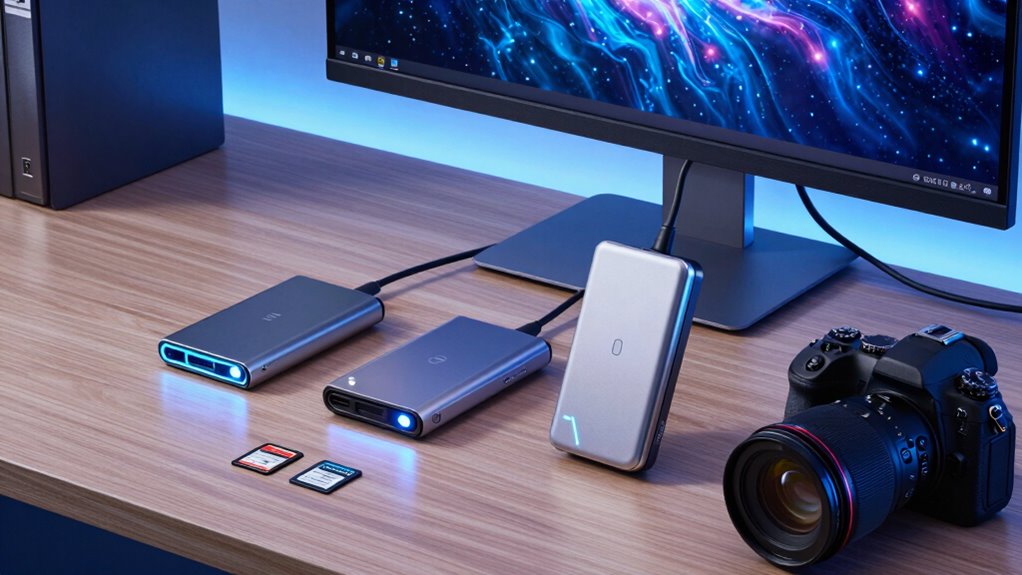
Astrophotography creates a particular kind of ingest problem: after a long night, I want to move large RAW files to a computer quickly, keep cards organized, and avoid carrying more hardware than the field kit needs. My strongest all-round fit is the ProGrade CFexpress Type B and SDXC Reader, since it combines two common card formats with simultaneous transfer support. For a Type A camera, the ProGrade USB 4.0 Type A Reader offers the highest stated connection bandwidth; for a smaller SD-only kit, the ProGrade PG08 is the most compact dual-slot choice.

Get school and study supplies delivered free — and shop member deals
- Fast, free delivery on millions of items
- Access to Prime Big Deal Days deals on October 6–7
- Prime Video, Amazon Music and more included
The tradeoff is that headline interface speed is not the same as actual card speed. A reader, card, cable, host port, and computer storage all shape the transfer, and a faster connection cannot make a slower card write or read faster. I ranked these options around astro-photo workflow fit: media compatibility, practical batch handling, portability, and how clearly the supplied details describe performance. Before choosing, match the reader to the exact card format your camera uses.
Key Takeaways
- Best mixed-media fit: The ProGrade Type B and SDXC reader combines two slots and supports simultaneous transfers, useful when a night’s captures span CFexpress Type B and SD cards.
- Highest stated interface bandwidth: ProGrade’s USB 4.0 Type A reader lists up to 40 Gbps, but it reads Type A cards only and needs a compatible host connection to benefit.
- Best compact SD option: The PG08 reads two SD cards and has a small footprint, though its listed and advertised transfer figures do not align.
- Best Type A plus SD pairing: The PG09 accommodates both formats and includes a magnetic plate, but its interface compatibility details deserve a check before purchase.
- Reader speed has limits: Actual offload time depends on the card, host port, cable, and destination drive—not just the reader’s maximum connection rate.
| ProGrade Digital CFexpress Type B and SDXC Card Reader, USB 3.2 |  | Best Overall for Mixed Astro Camera Kits | Supported media: CFexpress Type B and SD | Card slots: 2 | Connectivity: USB 3.2 Gen 2 | VIEW ON AMAZON | See Our Full Breakdown |
| ProGrade Digital CFexpress Type A Card Reader USB 4.0 |  | Best Premium-Speed Interface for Type A Cards | Compatibility: CFexpress Type A cards | Slots: 1 | Connectivity: USB 4.0 | VIEW ON AMAZON | See Our Full Breakdown |
| Lexar CFexpress Type B/SD Card Reader, USB 3.2 Gen 2, Up to 10Gbps |  | Best for Straightforward Dual-Card Offloads | Supported cards: CFexpress Type B and SD | Connectivity: USB 3.2 Gen 2 | Maximum transfer speed: Up to 10 Gbps | VIEW ON AMAZON | See Our Full Breakdown |
| ProGrade Digital CFexpress Type A and SDXC Card Reader (PG09) |  | Best Type A and SD Flexibility | Supported media: CFexpress Type A and SDXC | Slots: 2 | Connectivity: USB 3.2 Gen 2 listed | VIEW ON AMAZON | See Our Full Breakdown |
| ProGrade Digital USB 3.2 Dual-Slot SD UHS-II Card Reader (PG08) | 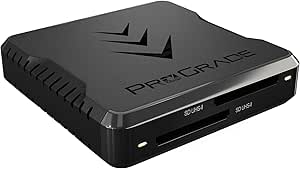 | Best Compact Reader for SD-Only Kits | Media types: SD, SDXC, and UHS-II | Slots: 2 | Connectivity: USB 3.2 | VIEW ON AMAZON | See Our Full Breakdown |
| high speed card readers for astro photo workflow | Connectivity | Warranty | Slots |
|---|---|---|---|
| ProGrade Digital CFexpress Typ | USB 3.2 Gen 2 | 2 years | — |
| ProGrade Digital CFexpress Typ | USB 4.0 | 2 years | 1 |
| Lexar CFexpress Type B/SD Card | USB 3.2 Gen 2 | 2 years | — |
| ProGrade Digital CFexpress Typ | USB 3.2 Gen 2 listed | 2 years | 2 |
| ProGrade Digital USB 3.2 Dual- | USB 3.2 | 2 years | 2 |
More Details on Our Top Picks
ProGrade Digital CFexpress Type B and SDXC Card Reader, USB 3.2
I put this reader first because it matches a practical astrophotography setup better than a single-format model. Its CFexpress Type B and SD slots cover two widely used media types, and the product description says both can transfer simultaneously. That can simplify a post-session routine when one camera card holds the main image sequence and another holds supporting frames or material from a second body. Its stated ceiling of 10 Gb/s is in line with the other USB 3.2 Gen 2 choices here, rather than a standout speed claim.
Compared with the Lexar Type B/SD reader, this ProGrade offers similar core format coverage and transfer bandwidth, while adding a magnetic mounting plate and Refresh Pro support for compatible ProGrade cards. The Lexar includes both Type-C-to-Type-C and Type-C-to-Type-A cables, which makes its out-of-box connection options clearer. I would pick the ProGrade for its workflow features, not on the assumption that it will beat the Lexar in a real transfer.
The main limitation is that the 10 Gb/s maximum depends on the whole chain: card performance, cable, computer port, and destination drive all matter. The mounting arrangement also asks me to attach the included metal plate, which may not suit every laptop or field setup. Buyers seeking Type A support should skip this model and choose the PG09 or the USB 4.0 Type A reader instead.
Pros:- Supports CFexpress Type B and SD cards
- Supports simultaneous transfers from both slots
- Magnetic mounting plate can help keep a mobile workstation compact
- Refresh Pro support for compatible ProGrade cards
Cons:- Actual performance depends on the cards, host, cable, and destination drive
- The magnetic setup requires attaching the included metal plate
Best for: Astrophotographers using CFexpress Type B and SD cards who want a dual-slot reader for a laptop-based offload workflow.
Not ideal for: Buyers with CFexpress Type A cameras, or anyone who wants to avoid attaching a metal plate to a laptop.
- Supported media:CFexpress Type B and SD
- Card slots:2
- Connectivity:USB 3.2 Gen 2
- Maximum transfer rate:Up to 10 Gb/s (up to 1.25 GB/s)
- Mounting:Magnetic system with included adhesive metal plate
- Refresh Pro:Supported for compatible ProGrade cards
- Color:Black
- Warranty:2 years
Our verdict“For a mixed Type B and SD workflow, I’d choose this ProGrade first for its useful dual-format, simultaneous-transfer design.”
ProGrade Digital CFexpress Type A Card Reader USB 4.0
This is the speed-focused option for a Type A camera kit. ProGrade lists USB 4.0 and up to 40 Gbps, four times the stated interface ceiling of the 10 Gb/s USB 3.2 models in this group. That headroom may suit a fast Type A card and a computer with a compatible USB 4.0 connection, particularly when transferring a large night’s capture set. The compact magnetic design and included certified USB 4.0 cable also make the connection story more complete than the PG09’s less clear interface listing.
That bandwidth advantage is conditional. The reader is single-slot and Type A only, so it cannot consolidate SD cards or move two cards at once. It is a more specialized purchase than the PG09, which pairs Type A with SD, and it does not automatically deliver faster transfers if the card, host port, cable path, or storage drive becomes the bottleneck. For a general mixed-format astro kit, I’d favor a dual-slot reader over this model.
Choose it when Type A is the fixed requirement and the rest of the workstation can make use of USB 4.0. Skip it if your camera uses Type B or SD, or if you want one reader to handle cards from several cameras. Its two-year warranty is a useful stated support detail, but the supplied information does not list status indicators or extra card-management features.
Pros:- Lists USB 4.0 connectivity with up to 40 Gbps transfer speed
- Compact magnetic design suits a portable laptop workstation
- Includes a certified USB 4.0 cable
- Includes a 2-year warranty
Cons:- Single slot does not support simultaneous card transfers
- Supports CFexpress Type A only
- The stated interface ceiling does not guarantee matching real-world offload speed
Best for: Astrophotographers using CFexpress Type A cards with a USB 4.0-capable computer and a high-volume offload routine.
Not ideal for: People with SD or Type B cards, mixed-format kits, or computers without a compatible high-bandwidth connection.
- Compatibility:CFexpress Type A cards
- Slots:1
- Connectivity:USB 4.0
- Maximum transfer speed:Up to 40 Gbps
- Cable:Certified USB 4.0 cable included
- Design:Compact with magnetic attachment
- Warranty:2 years
Our verdict“For a Type A-only workflow with compatible USB 4.0 hardware, this is the speed-first pick, but its narrow format support keeps it from being the best general reader.”
Lexar CFexpress Type B/SD Card Reader, USB 3.2 Gen 2, Up to 10Gbps
The Lexar earns its place for photographers who want a simple Type B plus SD reader without leaning on extras. It supports simultaneous transfers from both card types and lists up to 10 Gbps over USB 3.2 Gen 2. For an astro session split across a CFexpress Type B camera and an SD-based camera, that combination can reduce the number of separate readers on the desk. It also includes both Type-C-to-Type-C and Type-C-to-Type-A cables, giving buyers a clearly stated way to connect to different host ports.
Compared with the ProGrade Type B/SD model, the Lexar makes cable options more explicit, while the ProGrade adds magnetic mounting and Refresh Pro support for compatible cards. Both have two card formats and a 10 Gb/s ceiling, so I would base the choice on whether cable flexibility or magnetic workstation organization matters more. Neither listing gives a reason to assume its real-world transfer rate will beat the other.
The tradeoff is a focused feature set. It reads CFexpress Type B and SD only, with no Type A support, and the supplied description does not mention rugged or weather-resistant construction. That is worth factoring into a field kit exposed to dust or damp conditions; a card reader should be packed away when not in use. For a single-format Type A workflow, the ProGrade USB 4.0 reader is the more relevant match.
Pros:- Supports CFexpress Type B and SD cards
- Supports simultaneous transfer from two cards
- USB 3.2 Gen 2 connection lists up to 10 Gbps
- Includes Type-C-to-Type-C and Type-C-to-Type-A cables
Cons:- Does not support CFexpress Type A
- No ruggedness or waterproofing is specified
- The maximum rate depends on the connected cards and computer
Best for: Photographers who use CFexpress Type B and SD cards and want a dual-slot reader with clearly specified USB-C and USB-A cable options.
Not ideal for: Type A users, or field workers who need documented water resistance or rugged protection.
- Supported cards:CFexpress Type B and SD
- Connectivity:USB 3.2 Gen 2
- Maximum transfer speed:Up to 10 Gbps
- Simultaneous transfers:Supported
- Included cables:Type-C to Type-C and Type-C to Type-A
- Design:Compact
- Warranty:2 years
Our verdict“I’d choose the Lexar for an uncomplicated Type B and SD setup where included cable options matter more than magnetic mounting.”
ProGrade Digital CFexpress Type A and SDXC Card Reader (PG09)
The PG09 is the flexible choice for an astro-photo kit that mixes CFexpress Type A and SDXC. Two slots make it more adaptable than the USB 4.0 Type A reader, which accepts Type A cards only, and the listed 10 Gb/s USB 3.2 Gen 2 connection gives it a familiar speed class alongside the Type B dual-slot options. The magnetic attachment plate is also useful for keeping a compact reader close to a laptop during a field-side backup.
I rank it below the Type B/SD options for general versatility because its supported formats are more specific to Type A and SDXC, and its connection details need extra checking. The supplied listing names USB 3.2 Gen 2, yet its hardware-interface field includes Lightning and USB. That inconsistency makes host compatibility less clear than the Lexar’s explicit cable details. I would verify the actual connection and supported host before relying on it for a planned workflow.
Against the USB 4.0 Type A model, the PG09 gives up the higher listed bandwidth but gains a second format. That is a sensible exchange if SDXC cards are part of the same kit; it is less compelling when every card is Type A and the computer supports USB 4.0. The two-year warranty and magnetic plate add practical value, but neither resolves the interface ambiguity.
Pros:- Supports both CFexpress Type A and SDXC
- Lists USB 3.2 Gen 2 with up to 10 Gbps transfer speed
- Magnetic attachment plate supports a compact laptop setup
- Includes a 2-year warranty
Cons:- Listed Lightning and USB interfaces create compatibility uncertainty
- Does not support CFexpress Type B
- Its stated maximum is below the USB 4.0 Type A reader’s listed ceiling
Best for: Astrophotographers who need one reader for CFexpress Type A and SDXC cards and value a laptop-mounted setup.
Not ideal for: Buyers who need Type B support or who cannot confirm the reader’s host connection and compatibility details.
- Supported media:CFexpress Type A and SDXC
- Slots:2
- Connectivity:USB 3.2 Gen 2 listed
- Maximum data transfer rate:Up to 10 Gbps
- Mounting:Magnetic attachment plate
- Color:Black
- Dimensions:5.91 × 4.72 × 1.18 in
- Warranty:2 years
Our verdict“The PG09 is a useful two-format Type A and SDXC option, provided its connection details match your computer before buying.”
ProGrade Digital USB 3.2 Dual-Slot SD UHS-II Card Reader (PG08)
If my astro camera kit records to SD rather than CFexpress, the PG08 is the smallest, most focused option in this lineup. It supports two SD cards, including SDXC and UHS-II, in a body listed at 2.79 inches square. That compact footprint can be easier to pack alongside batteries, cables, and a laptop than the larger CFexpress readers. It also has a magnetic mounting plate and Refresh Pro support for compatible ProGrade memory cards.
Compared with the ProGrade Type B/SD reader, the PG08 gives up CFexpress support but keeps a dual-slot setup for an SD-only workflow. It also differs from the Type A USB 4.0 model by putting format flexibility and size ahead of interface bandwidth. If your camera records to UHS-II SD, this may be the more relevant fit; if your card is CFexpress, this model cannot serve as the reader.
I would be cautious about the speed claim: the description advertises up to 10 Gb/s, while another listed figure is 5000 megabits per second. That discrepancy makes performance harder to judge from the supplied details, and the actual result will also depend on card and host capabilities. Its compact design is appealing, but buyers prioritizing a clearly stated high-speed ceiling should compare the Type B/SD ProGrade or Lexar instead.
Pros:- Reads SD, SDXC, and UHS-II cards
- Two slots support handling two SD cards
- Compact body with a magnetic laptop mounting plate
- Refresh Pro support for compatible ProGrade cards
Cons:- Does not read CFexpress cards
- Advertised and listed transfer-rate figures differ
- Actual speed depends on card and host support
Best for: Astrophotographers using SD, SDXC, or UHS-II cards who want a compact dual-slot reader for a small laptop kit.
Not ideal for: Users whose cameras record to CFexpress, or buyers who need an unambiguous transfer-rate specification.
- Media types:SD, SDXC, and UHS-II
- Slots:2
- Connectivity:USB 3.2
- Advertised data transfer rate:Up to 10 Gb/s
- Other listed rate:5000 megabits per second
- Dimensions:2.79 × 2.79 × 0.71 in
- Refresh Pro:Supported for compatible ProGrade cards
- Warranty:2 years
Our verdict“For an SD-only astro kit, the PG08 is the compact pick, but I would confirm the rate details if offload speed is the main priority.”

How We Picked
I ranked these readers for the part of astrophotography that follows capture: getting files from camera cards onto a laptop or other compatible host in a reliable, manageable way. Large RAW sequences, calibration frames, and multiple nights of data can make offload speed matter, but an impressive number on a product listing is only useful when the card and computer can take advantage of it.
Media fit came first. I looked at whether each reader supports SD, CFexpress Type A, or CFexpress Type B, then weighed whether its slot combination makes sense for a mixed camera kit. I gave extra workflow value to dual-slot models that describe simultaneous transfers, while distinguishing that feature from simply having two slots.
Next, I compared connection claims and portability. USB 3.2 Gen 2 readers list up to 10 Gbps, while the Type A USB 4.0 model lists up to 40 Gbps. Those figures describe interface ceilings, not guaranteed card-to-drive performance. Magnetic attachment plates can help keep a small field workstation tidy, but they also require a suitable laptop surface or attaching the included plate.
I also accounted for unclear or conflicting specification details instead of smoothing them over. The PG08 has different listed and advertised rate figures, and the PG09’s listed interfaces may leave buyers uncertain about compatibility. No reader was treated as universally fastest: the best match depends on the camera card format, computer ports, cables, and storage destination.
| high speed card readers for astro photo workflow | Connectivity |
|---|---|
| ProGrade Digital CFexpress Typ | USB 3.2 Gen 2 |
| ProGrade Digital CFexpress Typ | USB 4.0 |
| Lexar CFexpress Type B/SD Card | USB 3.2 Gen 2 |
| ProGrade Digital CFexpress Typ | USB 3.2 Gen 2 listed |
| ProGrade Digital USB 3.2 Dual- | USB 3.2 |
Factors to Consider When Choosing High Speed Card Readers For Astro Photo Workflow
For astro-photo offloads, I start with the cards in the camera bag, then check the computer and storage path. A reader is only one link in a workflow that may include several hours of RAW captures.Match the reader to the camera card
Check the precise format printed on the card or listed in the camera documentation. CFexpress Type A and Type B are different formats, and neither reader should be assumed to support the other. SD and SDXC support also does not mean every older SD card will transfer at the same rate. The PG09 and USB 4.0 ProGrade model are Type A choices; the Type B ProGrade and Lexar handle Type B with SD; the PG08 is for SD-family media.
Treat bandwidth claims as ceilings
A 40 Gbps interface claim sounds far above a 10 Gb/s one, but it does not promise that a card will transfer data at that rate. The card’s read speed, reader, cable, host port, and destination drive all affect the result. The USB 4.0 Type A model makes most sense when the computer supports a suitable connection and the card can use the extra headroom. For other setups, a well-matched 10 Gb/s reader may be the more practical choice.
Decide whether two slots help your routine
Dual slots can reduce cable and reader clutter when a session uses more than one card format, and the Type B ProGrade and Lexar descriptions specify simultaneous transfer support. Do not assume that every two-slot reader copies both cards at once unless the product details say so. For a single-camera workflow, one slot may be enough; for two bodies or separate capture and backup cards, simultaneous handling can make the end-of-night routine more direct.
Check the connection before a field session
Confirm whether the laptop has USB-C, USB-A, USB 3.2 Gen 2, or USB 4.0, then match the reader and cable. The Lexar explicitly includes Type-C-to-Type-C and Type-C-to-Type-A cables, while the USB 4.0 Type A reader includes a certified USB 4.0 cable. The PG09’s listed Lightning and USB interface details are not fully clear, so I would verify compatibility before adding it to a remote-work setup. A fast reader with the wrong cable is not a useful field tool.
Plan for mounting, handling, and file safety
A magnetic plate can keep a reader from wandering across a small table, but attaching an adhesive plate to a laptop is a commitment. Consider whether the computer surface and field arrangement suit that approach. After copying a night’s work, verify the files and keep the camera cards intact until a second copy is available. Transfer speed is secondary to a dependable backup routine when the images cannot be recreated.
Frequently Asked Questions
Which reader is the best all-round choice for astrophotography?
I’d start with the ProGrade CFexpress Type B and SDXC reader if the camera kit uses those formats. It supports both card types and describes simultaneous transfers, giving it a practical advantage for mixed-media offloads. If your cards are Type A, SD-only, or another format, match the reader to that media instead of choosing by ranking alone.
Does a 40 Gbps reader always transfer files faster than a 10 Gb/s reader?
No. The 40 Gbps figure is the USB 4.0 reader’s stated interface ceiling, not a guaranteed card-to-computer result. Card performance, host-port capability, cable, and destination storage can all limit throughput. The faster interface is most relevant when the rest of the workflow can take advantage of it.
Can I use a CFexpress Type A reader with Type B cards?
No. Type A and Type B are distinct card formats, so a reader that supports one should not be treated as compatible with the other. Check the supported-media specification against the exact card in your camera. In this lineup, the two Type B/SD models are the ProGrade dual-slot reader and the Lexar reader.
Are two card slots useful for a one-camera astro workflow?
They can be useful if the camera or session uses two supported card types, or if you regularly ingest cards from multiple bodies. The ProGrade Type B/SD and Lexar models specify simultaneous transfers, which may help with a batch offload. If you only use one card format and transfer one card at a time, a second slot may add little to your routine.
What should I check before buying a reader for a laptop?
Check the card format, laptop port, included cable, and whether the product specifies the speed standard you want to use. Also check how magnetic mounting works: some models include a plate that must be attached to the laptop. For the PG09, I would pay particular attention to its interface listing, since the supplied details name both USB and Lightning and leave compatibility less clear.
Conclusion
For most mixed CFexpress Type B and SD astrophotography kits, I’d choose the ProGrade Type B and SDXC reader for its two-format support and simultaneous transfers. If Type A is your camera’s format and you have USB 4.0 on the computer, the ProGrade USB 4.0 reader is the bandwidth-focused pick; choose the PG09 instead when SDXC flexibility matters more, after confirming its connection compatibility. SD-only users should look at the PG08 for its compact body, while buyers who want clear cable options for a Type B and SD setup should compare the Lexar. In every case, match the reader to the card and host, and verify your copied files before clearing a camera card.
Halloween Picks
halloween
As an affiliate, we earn on qualifying purchases.